
I was three hours deep into a spreadsheet last Tuesday when I realized I couldn’t actually turn my head to the left without a sharp, stabbing pain. It felt like someone had driven a dry-wall screw directly into my upper trap. My laptop was sitting flat on the kitchen table, and I was hunched over it like a gargoyle guarding a cathedral. I thought I was being productive. In reality, I was just auditioning for a lifetime of chronic discomfort. We’ve all been there, staring at that glowing screen until our shoulders reach our ears. Today, I’m going to show you exactly how to break that cycle and set up your mobile workstation so your spine actually likes you again.
Your Laptop Is a Physical Therapy Trap
I used to be the king of the ‘couch office.’ I figured that as long as I was comfortable, my body was fine. That was my first big mistake. Laptops are ergonomically disastrous because the screen and the keyboard are attached. If the keyboard is at the right height for your wrists, the screen is too low for your eyes. This forces you into a forward-head posture that is absolutely brutal on your cervical spine. You might notice why your head feels heavy after a long day at the computer; it’s because your muscles are working overtime to keep you upright. A study published in Surgical Technology International found that tilting your head forward at a 60-degree angle increases the load on your neck to a staggering 60 pounds. That is like carrying a heavy suitcase on your neck for eight hours a day. No wonder your headaches start at the computer before you even hit your lunch break. I ignored these signals for years until I finally learned how to safely adjust my own posture throughout the day using simple, non-negotiable height rules. Have you ever felt that sharp pinch right behind your ear or a burning sensation between your shoulder blades after a long Zoom call?
Does all this ergonomic gear actually matter?
You might be thinking that you don’t want to turn your dining room into a high-tech lab or spend a fortune on plastic stands. I get it. I was a skeptic too, especially when I saw people using those weird-looking vertical mice. But the truth is, you don’t need a massive budget; you just need to understand the relationship between your eye level and your keyboard. If you don’t fix the height, even the best 10-second posture reset won’t save you from the inevitable slump. We are going to look at the ‘Why’ behind every adjustment so you can stop guessing and start feeling better.
How to Turn Your Kitchen Table Into a Spinal Safe Zone
The fix isn’t about buying a three-thousand-dollar chair; it’s about geometry. Think of your spine like a crane. When the heavy weight (your head) is positioned directly over the base (your shoulders), the system is stable. But when you lean that crane forward to see a low laptop screen, the cables—your muscles—have to pull with ten times the force to keep the crane from toppling over. To stop this, the first thing you must do is separate the screen from the keyboard.
Put the Screen Where Your Eyes Actually Live
Your eyes are the primary drivers of your posture. If your screen is low, your neck will follow it down, regardless of how much you try to sit up straight. You need to raise that laptop until the top third of the screen is at eye level. I’ve used everything from professional aluminum stands to a stack of heavy cookbooks and even a sturdy shoe box. When I was stuck in a hotel in Chicago last year, I used two thick phone books I found in a drawer to get my screen up. It looked ridiculous, but it was the first time in weeks I didn’t have a nagging tension headache by 4 PM. If you find yourself squinting or leaning in, you might want to check if 3 signs your neck pain is actually coming from your eyes apply to your situation. 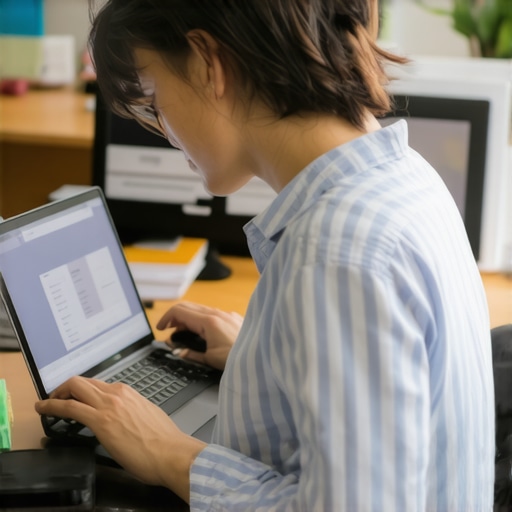
The External Keyboard is Non-Negotiable
Once the laptop is elevated, you can’t reach the keyboard without looking like a T-Rex. This is where most people fail. You need a separate Bluetooth keyboard and mouse. This allows your elbows to stay tucked at your sides at a 90-degree angle, which keeps your shoulders from creeping up toward your ears. If your wrists are angled upward or downward, you’re inviting carpal tunnel issues. By separating the two, you allow your upper back to stay open. If you feel that familiar ‘burn’ between your blades, try the thoracic extension move that saves your shoulders to reset the mid-back mid-day.
Don’t Let Your Lumbar Spine Collapse
Your lower back is the foundation for everything happening up top. Most kitchen chairs or couches cause your pelvis to tuck under, which creates a massive amount of pressure on your discs. I remember a specific Tuesday where I tried to ‘power through’ a project while sitting in a soft, low-slung bucket chair. Three hours later, I stood up and felt a sharp, electric jolt. I had spent so long in a ‘C’ shape that my L5-S1 disc was under siege. To prevent this, you need to learn how to sit without compressing your l5-s1 disc by keeping your hips slightly higher than your knees. This simple shift forces your pelvis into a neutral position, which naturally supports the curve of your lower back. You can achieve this by sitting on a firm wedge pillow or even a folded-up bath towel.
Why You Should Act Like a Piston
Even with a perfect setup, the body is designed for motion, not static holding. I like to tell my clients to think of themselves as a piston in an engine—always ready for the next stroke. Every 30 minutes, you need a ‘posture break.’ This isn’t a 20-minute gym session; it’s a 30-second reset. Stand up, perform a quick hip hinge secret for people with chronic lumbar issues, and take three deep belly breaths. This flushes the tissues with fresh blood and prevents the ‘setting’ of fascia that makes you feel like a hundred-year-old man when you finally stand up for dinner. If your shoulders still feel like they are rolling forward, incorporating how to use a wall slide to fix rounded shoulders into your morning routine can make your desk-bound hours significantly less damaging to your long-term spinal health.
While fixing your screen height is a massive win, I have to be honest: most people fail long-term because they fall for the same three ‘rehab’ traps that kept me in pain for years. We’ve been conditioned to think that if something feels tight, we should stretch it, and if it hurts, we should roll it out. But when it comes to the complex relationship between your desk posture and your nervous system, common sense is often your worst enemy.
Stop Stretching Your Hamstrings to Fix Your Back
I see this every single day: a patient comes in with a stiff lower back from sitting and spends twenty minutes a day trying to touch their toes. They think ‘tight’ means ‘short.’ In reality, your hamstrings are often tight because they are over-lengthened and acting as a secondary brake for a pelvis that is tilting too far forward. When you aggressively stretch them, you aren’t releasing a muscle; you are likely irritating the sciatic nerve. This is exactly why stretching your hamstrings won’t fix your chronic tightness and might actually be the reason your lower back feels like it’s on fire by 5 PM. Instead of stretching, you need to learn how to identify if your back pain is muscular or nerve-related before you make things worse.
The Foam Roller Trap That Actually Increases Pain
Here is the ‘Oops’ factor that almost nobody talks about: please, stop rolling your lower back. I know it feels like a ‘good’ kind of hurt in the moment, but the lumbar spine is inherently different from the upper back. Your thoracic spine (upper back) has the support of your rib cage, making it a great candidate for mobility work. Your lower back is a bridge held together by muscle and fascia. When you put a hard foam roller under your lumbar spine, you are essentially jamming those vertebrae together into a hyper-extended position. There is a reason why you should never roll your lower back on a foam roller; it destabilizes the very area that needs the most support. 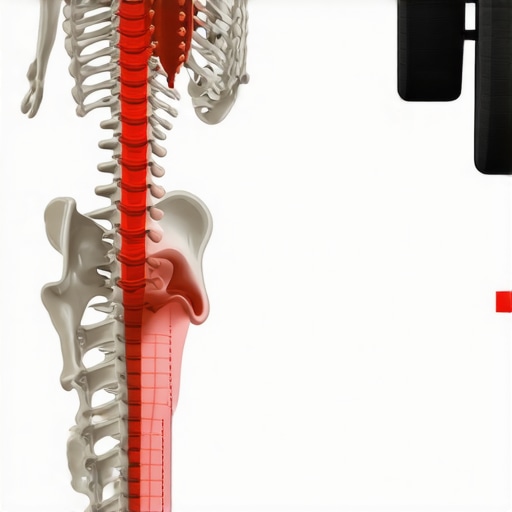
Why Does that Great Adjustment Only Last for 48 Hours?
If you’ve ever walked out of a clinic feeling like a new person only to have the tension return two days later, you’re not alone. This is the nuance of ‘neurological lag.’ An adjustment isn’t just about moving a bone; it’s a high-velocity input to the nervous system that resets the ‘tone’ of the surrounding muscles. However, if you go right back to your unoptimized kitchen table setup, your brain will revert to its old protective patterns. The science behind chiropractic adjustments for back pain relief shows that we aren’t just ‘fixing’ a joint, we are cleaning up the signal between the brain and the body. But that signal only stays clear if the environment supports it. Dr. Stuart McGill, a world-renowned expert in spine biomechanics, emphasizes that ‘spine hygiene’—the way you move throughout the day—is actually more predictive of long-term recovery than any single treatment. This is the truth about why your adjustments don’t seem to last: the treatment fixes the signal, but your desk habits are the static that keeps coming back. Have you ever fallen into this trap of stretching your way into more pain? Let me know in the comments below.
Maintaining a healthy spine isn’t about an hour-long yoga session once a week; it’s about the weapons you keep in your desk drawer and the habits you build into your workflow. I’ve tried every fancy gadget on the market, from vibrating foam rollers to expensive ergonomic chairs, but my go-to tool remains a simple, high-density rubber lacrosse ball. Unlike a soft tennis ball that collapses under pressure, a lacrosse ball provides the localized compression needed to actually affect the deep fascia of the paraspinal muscles. I use it to hunt for ‘hot spots’ along my shoulder blades—this is essentially how to use a lacrosse ball to melt away mid-back knots without needing a professional massage every Tuesday. Dr. Kelly Starrett, author of *Becoming a Supple Leopard*, often talks about ‘unresolved business’ in our tissues. If you don’t manually clear those tight corners where the muscle meets the bone, your body will eventually compensate by stiffening the nearby joint to protect itself.
How do I maintain my spinal health when life gets chaotic?
The secret is in the ‘micro-dose’ of movement. I stopped looking at rehab as a tedious chore and started seeing it as a series of essential tips for managing back pain through healthy lifestyle choices. When I’m on a long call, I don’t just sit; I stand and shift my weight, or I’ll do a quick standing glute squeeze to wake up my posterior chain. This is part of strategic chiropractic solutions for long-term back health—staying ahead of the stiffness before it becomes a structural problem that requires intensive intervention.  I’m also a huge advocate for using ‘anchor points’ throughout the day to trigger a physical check-in. Every time I hit ‘send’ on an email, I do one deep shoulder roll. Every time I pour a cup of coffee, I do a quick neck tilt. If you are an athlete, you can boost your sports rehab journey with proven chiropractic strategies by simply focusing on your ribcage position during these micro-breaks.
The Future of Posture is Wearable and Predictive
I think we are moving away from reactive care where we only fix things when they break. In the next five years, I predict we will see widespread adoption of haptic-feedback wearables—tiny sensors on our skin that gently vibrate the second our thoracic spine starts to round into that ‘laptop slump.’ We won’t have to ‘remember’ to sit up; our tech will train our nervous system in real-time through subtle biofeedback. This is exciting because how spinal alignment directly impacts your athletic performance isn’t just about speed or power; it’s about the efficiency of the nervous system as a whole. When your spine is stacked, your brain communicates with your limbs faster and with less interference. If you’re serious about long-term relief, I want you to try one specific thing today: set a timer for every 45 minutes and perform five slow, deep belly breaths. It sounds too simple to work, but the change in your internal abdominal pressure is a literal reset for your lumbar spine that prevents the ‘setting’ of bad posture.
The Hardest Lessons I Learned While Fighting My Own Desk Slump
One of the biggest eye-openers for me was realizing that feeling ‘tight’ doesn’t always mean you need to stretch. In fact, essential tips for managing back pain through healthy lifestyle choices often focus more on stability than flexibility. I spent years stretching my hamstrings only to realize I was actually irritating my nerves. Another lightbulb moment? Your setup isn’t static. Even the best ergonomic chair won’t help if you don’t incorporate a boost to your sports rehab journey with proven chiropractic strategies like movement variability throughout your day. Finally, I learned that my eyes were the boss of my neck; if I didn’t address how to fix the forward shoulder slump from cell phone use and screen height, my posture would always collapse regardless of my willpower.
My Minimalist Toolkit for a Resilient Spine
I don’t believe in cluttering your office with gadgets, but these four items changed my life. First, I highly recommend ‘Back Mechanic’ by Dr. Stuart McGill; it’s the definitive guide to understanding spine hygiene. Second, a simple high-density lacrosse ball is my go-to for home maintenance. Third, a basic adjustable laptop stand is the only way to get your screen at eye level without a stack of books. #IMAGE_PLACEHOLDER_E# Lastly, I’ve found that discovering how chiropractic adjustments can alleviate chronic back pain provides the neurological reset necessary to make these tools actually effective. These aren’t just items; they are the foundation of my daily recovery routine.
You Aren’t Stuck With Your Chronic Pain
The journey from a hunched-over gargoyle to someone who moves with ease doesn’t happen overnight, but it is entirely possible. You have the power to change your environment and your habits today. By implementing strategic chiropractic solutions for long-term back health, you are investing in a future where you aren’t limited by your desk job. Your spine is incredibly resilient—it just needs the right inputs and a little bit of respect. Which of these ergonomic shifts are you going to try at your desk today?